
What Attackers Do After Initial Access

After initial access, an attacker has only reached the starting line. The cyber attack lifecycle that follows runs through discovery, credential theft, privilege escalation, command and control, persistence, lateral movement, and finally the objective. Each step is a chance for defenders to catch the intrusion. Here is every stage from the attacker’s side, and what you can see at each one.
Someone clicked a link. A service token ended up in a public repo. An exposed app had a bug that let someone run code. The details vary, but the result is the same: the attacker is inside, holding a shell, a valid session, or a set of credentials the system accepts without complaint.
The reporting usually stops there. “Attacker gained access,” and we picture that as the whole event. But getting in is almost never the goal. It’s a starting position, and usually a weak one: few privileges, an unfamiliar host, no guarantee the access survives the next reboot. Everything that matters happens after the foothold, in the stretch between getting in and getting what they came for.
That stretch is also where defenders get most of their chances to catch the intrusion, and most of their chances to be looking the wrong way while it matures. So it’s worth walking through it the way the attacker actually experiences it, one decision at a time, each shaped by what the last step turned up. One warning up front: I’m laying this out in order, but nobody works in a straight line. I’ll come back to that.
First, figure out where you are: discovery
An attacker who just landed knows almost nothing. They have execution or a session and no context. What system is this? What account am I running as? What can it do? What’s reachable: other hosts, internal services, file shares, cloud APIs? And, more quietly, what’s watching me?
This is discovery, and the awkward part for defenders is how ordinary it looks. whoami /all, net group “domain admins” /domain, nltest /dclist, a few nslookup queries, maybe a curl to 169.254.169.254 to see what the cloud metadata service will hand over. On a Linux box it’s id, sudo -l, and a look through /etc/passwd. These are the same commands your admins run on an ordinary Tuesday, which is exactly why enumeration hides so well inside normal operations.
What gives it away is context, not the command itself. A workstation whose user has never opened a terminal suddenly running directory queries is a signal. A service account that does one narrow job branching out to inspect the domain is a signal. You can only see those signals if you know what normal looks like for that account and host, and that knowledge is built long before the attacker shows up. Least privilege, so the account they landed on can see less. Segmentation, so “what’s around me” comes back short and boring. Enough endpoint and identity logging that the enumeration actually leaves a trace someone can review later. An attacker who lands on a well-segmented, least-privileged host learns very little, and learning very little costs them time and options.
What credentials can I pull from here? Credential access
The machine itself is usually not the prize. What lives on it is.
Systems collect secrets whether you want them to or not. Cached domain credentials in LSASS. Access keys sitting in ~/.aws/credentials or a .env file. Tokens in browser storage, connection strings in a config, kubeconfig files, that metadata endpoint again handing temporary credentials to anything on the instance that asks. A single developer laptop or CI runner can hold keys to half a dozen other systems. The moment an attacker pulls a credential off a compromised host, they stop being an intruder on one machine and become a valid user somewhere else.
I think this shift matters more than almost any individual exploit, so it’s worth being blunt about why. An identity travels. It works through the front door, over approved channels, using protocols nobody questions, because those protocols exist to let that identity in. The box is a location and the identity is a capability. You can rebuild a location in an afternoon. A capability follows the attacker to wherever they decide to use it next.
The defenses here are structural, not clever. MFA, so a captured password alone gets nobody in. Short-lived credentials, so a stolen token expires before it’s worth much. A real secrets manager, so keys aren’t lying in config files waiting to be scooped up. Rotation, so a leaked secret has a shelf life. And separation between environments, so credentials on a general-purpose host don’t unlock the systems you’d actually hate to lose.
The theft itself is often silent, because reading a file leaves almost nothing behind. But the first time that credential is used it has to authenticate against something, and authentication is one of the most loggable events you have. Watch for use that doesn’t fit the identity: an account signing in from a host it’s never touched, a service credential showing up in an interactive logon, access to a system this identity has no business reaching. A 4624 from the wrong place is often the first honest sign that a quiet theft happened at all.
Moving up: privilege escalation
Sometimes the initial access is enough. Often it isn’t, and the attacker wants local admin, root, a Domain Admin account, or a cloud role that can do anything.
Privilege escalation succeeds for mundane reasons far more than clever ones. An account has more permissions than anyone intended. A service runs as SYSTEM and its binary path is writable. sudo -l reveals one command that can be turned into a shell (GTFOBins has a page for it). Software on the host is outdated and carries a known CVE nobody got around to patching. A privileged credential was left in a script that a lower-privileged user can read. Escalation is usually the attacker finding the one spot where your configuration was loose, and in an estate of any size there is almost always one spot.
So defenders push on the boring things: patch aggressively so vulnerable software isn’t sitting there waiting, keep permissions genuinely tight so there’s nothing to escalate into, and handle privileged accounts carefully so they aren’t exposed on machines that don’t need them. Detection keys on the result rather than the method: an ordinary account suddenly doing privileged work (4672 at a logon that has no business being privileged), a new name in an admin group (4728, 4732), an identity whose effective permissions changed with no ticket to explain it.
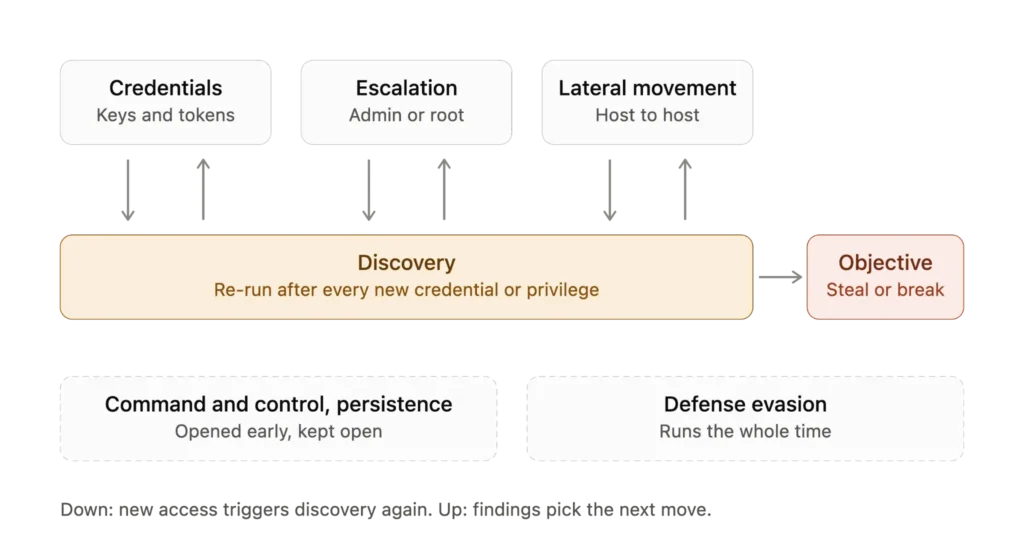
Here’s the thing that a clean top-to-bottom diagram hides. The attacker doesn’t finish discovery and move on. They grab a credential, then enumerate again, because a credential that reaches new systems reveals new things to look at. They escalate, then re-run discovery, because being administrator surfaces machines and accounts a normal user was never allowed to see. Discovery isn’t step one you complete. It’s the step they keep coming back to, and every new piece of access redraws the map. If you picture the whole intrusion as a loop that keeps passing back through discovery, you’re closer to the truth than any flowchart gets you.
Keeping a line open: command and control
Somewhere in here, usually earlier than this section’s placement suggests, the attacker needs a reliable way to keep talking to what they’ve compromised. Interactive access through a stolen VPN session is fine until it drops. Most operations of any size run through command and control instead: an implant on the host that reaches out to infrastructure the attacker controls and waits for instructions.
The whole game with C2 is blending in. A good implant beacons out over HTTPS to something that looks like a normal web destination, on a jittered interval so there’s no obvious heartbeat, sometimes fronted behind a reputable CDN or riding on a legitimate service like a cloud storage bucket, a Slack workspace, or a Telegram bot so the traffic goes somewhere your users already talk to. When HTTPS is too watched, DNS is the fallback, tunneling data out through query names to a domain the attacker owns. Frameworks like Cobalt Strike, Sliver, and Mythic exist to make all of this turnkey, which is why you see them across unrelated intrusions.
None of that is invisible, but you have to be looking at the network the way you look at identity. Egress that reaches a domain registered nine days ago. A workstation making steady, evenly-spaced connections to one host all day. DNS volume to a single domain that dwarfs everything else. TLS fingerprints (JA3 and friends) that match a known implant rather than a real browser. The uncomfortable truth is that C2 detection works best when you’ve decided in advance what your outbound traffic is supposed to look like, and most networks never do, so beacons hide in the general hum of things phoning home.
Making sure they can get back in: persistence
Footholds are fragile. The laptop gets rebooted, the phished session times out after eight hours, the helpdesk resets a password because the user forgot it. None of that is aimed at the attacker, and any of it can end the intrusion. So once they have something worth keeping, attackers set up a second way in.
The textbook version is malware that survives a reboot: a scheduled task, a new service, a Run key in the registry. That still happens, and a decent EDR catches a lot of it. What worries me more is persistence that isn’t a file at all. In AWS that’s a second access key on an existing IAM user. In Entra ID it’s a new client secret on an app registration, or an extra MFA method on a user who will never look at their security settings. On-prem it’s a new account nobody asked for, or an old one quietly added to a privileged group. There’s nothing on disk to scan. It’s a legitimate credential that happens to have two owners.
This is where I see incident response go wrong most often. The team finds the infected host, reimages it, and closes the ticket. Two weeks later the attacker logs in with a key nobody revoked, and now they’re working from a clean, fully trusted machine. If credentials might have been exposed, rotating them is part of the cleanup, not a nice-to-have. That includes the service accounts and API keys teams avoid rotating precisely because something might break.
A few events are worth alerting on by default:
- Domain controllers: 4720 (account created) and 4728/4732/4756 (member added to a security group).
- CloudTrail: CreateAccessKey and CreateLoginProfile.
- Entra audit logs: new credentials on service principals and newly registered authentication methods.
Most of these are rare in a normal week, so they’re cheap to watch. And if your organization creates access keys constantly, that’s a problem worth fixing for its own sake.
Staying quiet the whole time: defense evasion and living off the land
Underneath everything so far runs a second objective that never switches off: don’t get noticed. Getting in and staying in without tripping an alarm are two separate problems that a competent attacker solves at the same time.
This is defense evasion, and it’s the main reason signature-based detection ages so badly. When an attacker can avoid dropping recognizable malware, they will, operating instead with tools already present and trusted. certutil to pull down a payload, rundll32 and regsvr32 to execute one, PowerShell for everything, the same remote-management software your ops team deployed. These “living off the land” binaries look like admin work because they are admin tools. Alongside that comes cleanup: clearing the Security log (which itself writes a 1102), disabling script-block logging so 4104 stops recording, tampering with the EDR agent, deleting their own staging files.
So the useful question shifts away from is this file malicious, which a patient attacker can arrange to always answer no, and toward is this behavior normal. An account operating outside its usual pattern. Authentication from unexpected places or at unexpected hours. certutil reaching out to the internet on a machine that has never needed it. Access relationships that didn’t exist a week ago. Those anomalies survive even when every tool in play is legitimate, because an attacker can borrow your tools but not your baselines.
Turning one machine into many: lateral movement
Now the foothold grows, and a small compromise starts becoming a large one.
The attacker has credentials, some privilege, and a map of the environment, and they use all of it the way the environment expects them to. The trust relationships that exist for good operational reasons become the roads they travel: a management server that can reach every endpoint, an account that legitimately spans systems, a network path left open between two zones for convenience. This is lateral movement, and its most uncomfortable feature is that it rarely needs a new exploit. It needs a credential that’s valid on the next system and a route to reach it, and normal operations hand over both, because that’s what they’re for.
The mechanics are familiar: pass-the-hash or pass-the-ticket with a harvested credential, PsExec or WMI or WinRM to run commands on the next box, RDP where it’s allowed, service accounts that were granted access everywhere years ago and never trimmed back. One host becomes two, then a handful, then an account with reach across the domain or tenant. Each hop on its own is unremarkable, a valid logon from one internal system to another, the kind of thing that happens thousands of times a day. The attack lives in the pattern across the hops, which is why lateral movement so often gets reconstructed only in hindsight.
Slowing it down means limiting what any single foothold connects to. Segmentation, so reaching the next system isn’t automatic. Least privilege, so a stolen identity opens fewer doors. MFA on internal access, not just at the perimeter. Separate identities for separate trust zones, so no one credential spans the whole estate. And genuinely watching authentication between systems, including the Kerberos traffic on your domain controllers (4768, 4769), because lateral movement is a chain of logons, and a chain of unusual logons is something you can see if you were recording it and someone is looking at the chain instead of the individual links.

How far would one foothold get in your environment?
Taking something, or breaking it: exfiltration and impact
Eventually the attacker reaches something worth reaching, and the character of the operation changes. The question stops being where can I go and becomes what’s worth taking, and how do I get it out. This is collection and exfiltration: finding the data that matters, staging it (often compressed into a single archive to move it cleanly), and pushing it out, frequently over the same ordinary channels everything else uses, sometimes deliberately slowly to stay under whatever thresholds might be watching.
Defending this rewards unglamorous groundwork: knowing where your sensitive data actually lives, controlling and classifying who can touch it, and logging when they do. Then watch for the access pattern that doesn’t fit. A bulk read of records nobody bulk-reads. An account pulling far more than its role has ever needed. A large upload to a service the organization has no relationship with. DLP and egress monitoring earn their keep here, but only if somebody decided in advance what normal outbound traffic looks like. Without that baseline, exfiltration is just more bytes leaving the building.
Then the objective finally shows itself, the one thing you couldn’t have known at the start. This is impact, where intent becomes visible. The same foothold, reached through the same chain, might end in ransomware, quiet long-term espionage, payment fraud, straightforward data theft, or sabotage. The early and middle stages look nearly identical no matter which of those is coming, and that’s the whole problem: you usually can’t read the goal off the opening moves. Intent arrives last, and by the time it does, most of your response window has already closed.
What can actually see this: detection tooling
A word on tooling, since everything above assumes something is watching. No single product sees the whole chain. Endpoint detection (EDR) sees what runs on the host: discovery commands, credential dumping, living-off-the-land binaries. Identity monitoring, whether your directory’s own audit logs or a dedicated identity threat detection tool, sees logons, group changes and new credentials. Network monitoring sees beaconing, odd DNS and hops between internal systems. Cloud audit logs (CloudTrail, Entra) cover the persistence that leaves nothing on disk, and a SIEM is where those signals get stitched into a chain instead of staying separate links. None of it helps without a baseline of what normal looks like, which is the thread running through every stage above.
The point
Initial access is an event. Compromise is a process, and the process is longer than the headline ever admits: orienting on a strange host, harvesting whatever secrets it held, climbing toward something with more power, opening a reliable channel back, going quiet, spreading along trusted paths, and only at the very end acting on the real objective. Discovery threads through all of it, run again after every new credential and every new privilege.
Every one of those stages was also a chance for something to be too locked down to exploit, too well-segmented to cross, or too well-logged to do quietly. That’s what defense is really for. Not a wall that stops every intrusion at the door, because sooner or later one gets through, but enough prevention, visibility, and containment layered along the path that a single foothold runs out of room, credentials, or quiet before it turns into a full compromise. An attacker only has to get in once. To win, they have to get all the way through, and the distance between those two things is where you defend.
FAQ
Initial access is only a starting position. From there attackers typically orient themselves (discovery), harvest credentials, escalate privileges, set up command and control, establish persistence, avoid detection, move laterally, and finally collect data or cause impact. This phase is often called post-exploitation. Discovery repeats after each new credential or privilege, so the process behaves like a loop rather than a straight line.
The cyber attack lifecycle is the sequence of stages an intrusion passes through, from the first foothold to the attacker’s objective. In practice the stages overlap and repeat. Frameworks such as MITRE ATT&CK describe them as tactics rather than a strict order.
Usually mundane ones: accounts with more permissions than intended, services running as SYSTEM with a writable binary path, sudo rules that can be turned into a shell, outdated software with a known CVE, and privileged credentials left in scripts a lower-privileged user can read.
Attacks in which the intruder uses tools already present and trusted on the system, such as certutil, rundll32, regsvr32 and PowerShell, instead of dropping recognizable malware. Because these are administrative tools, detection depends on whether the behavior is normal for that account and host, not on whether a file is malicious.
Lateral movement is a chain of logons, so it has to be viewed as a chain rather than as individual events. Watch Kerberos activity on domain controllers (events 4768 and 4769), logons from hosts an account has never used, and service credentials appearing in interactive sessions. Segmentation, least privilege and MFA on internal access limit what one foothold can reach, and adversarial testing measures how long defenders take to notice (how often to run it).
By adding a second legitimate way in: an extra access key on an existing AWS IAM user, a new client secret or authentication method in Entra ID, or a new or quietly added privileged account on-prem. Nothing is written to disk, so cleanup has to include rotating credentials, not only reimaging the infected host.
Not Sure How Far One Foothold Would Get?
The useful question is not whether someone can get in, but how far one foothold goes and how long it takes anyone to notice.
CodeIT’s Continuous Threat Exposure Management (CTEM) maps attack paths across your infrastructure and identities and keeps them under review. Penetration Testing starts from a foothold and shows what an attacker could actually reach.